
Satisfy+ · The Homeowner's App
Satisfy+ watches your home, your projects and your car, and tells you what needs you next.
Open the app and the first thing you see is what needs you next, drawn from your own record. Every job has its own page for bids and payments, and every paper is filed on the home, project or car it belongs to.
Open the app and the first thing you see is what needs you next, drawn from your own record. Every job has its own page for bids and payments, and every paper is filed on the home, project or car it belongs to.
Getting started
The app shows you what the public record says about your home, and you confirm it.
Each fact shows whether it came from the public record or from you, so you always know what you're confirming and what you typed yourself. A loan recorded before the last sale is labeled as the previous owner's, not yours.
- The question it asks
- Is this your home?

You answer three questions if nothing is found.
Your home still gets set up, with its size and rooms taken from your answers instead of the record.
You tick the spaces your home has.
The app suggests the rooms and outdoor spaces a home like yours usually has, and those spaces become the starting point for projects.
You finish with a short list of what to add next.
The last screen suggests your insurance policy, and the move-in checklist if you bought the home this year.
Projects
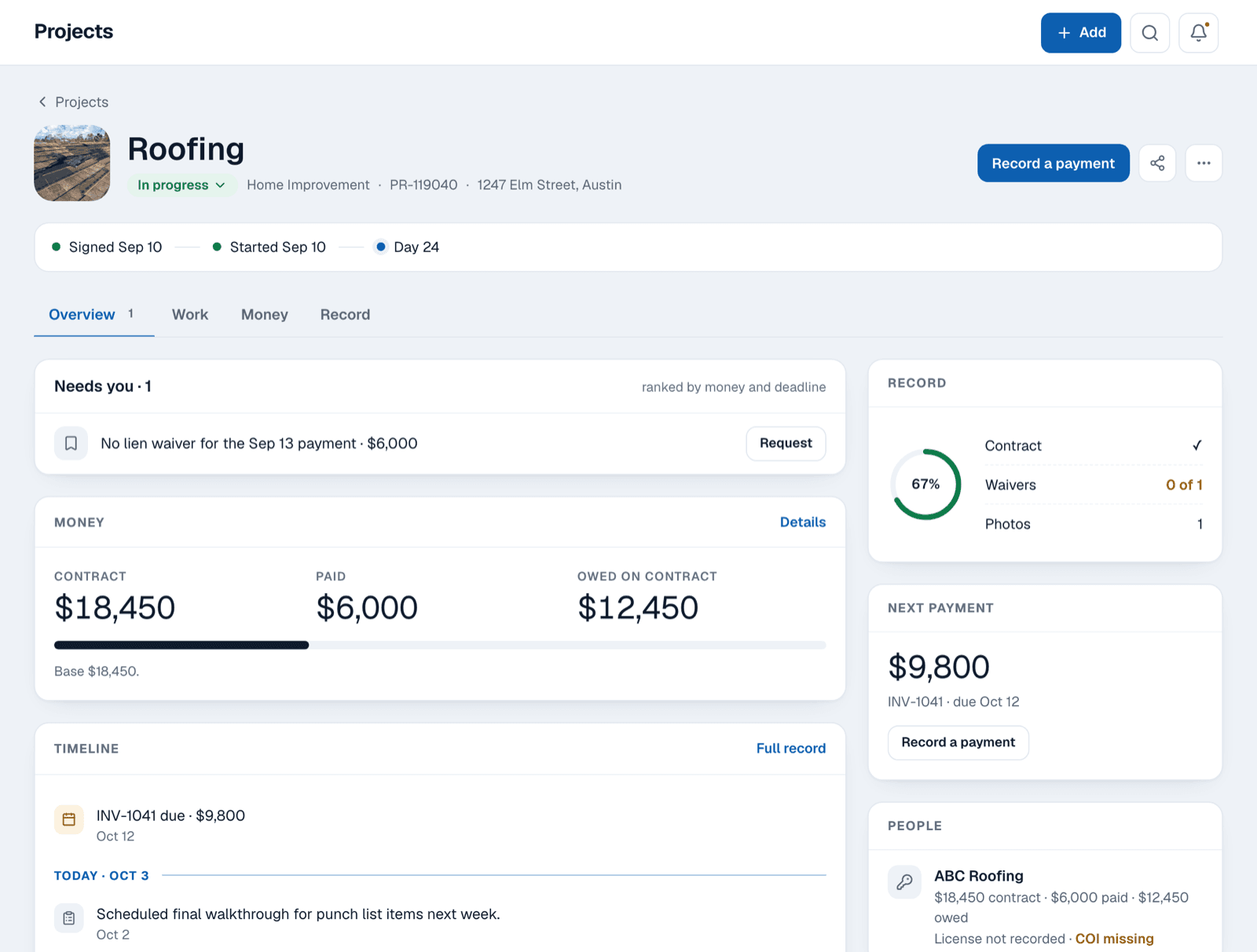
Every job gets its own page, and the record on it belongs to you, not the contractor.
The page holds the work, the money and a dated record of what happened. When the job ends, the record stays with your home.
You compare every bid on the same rows.
A quote shows Not stated wherever the contractor left a term out, so the gaps show up before you sign.
You see the trades a job like yours needs.
Each trade on the checklist is ticked off as you record it, and nothing the job needs gets forgotten.
You log what happened on the day it happened.
Each entry keeps the date of the event apart from the date you typed it, so your timeline stays accurate.
You keep the signed contract on the job.
The contract and its value sit on the project, so every invoice is checked against what you agreed to.
Money
You see what you've paid on a job and what you still owe.
Every invoice and payment sits on the job's page next to the contract you signed, so a bill that drifts from the quote stands out right away.

You record who paid each bill.
You mark a payment as paid by you, your lender or your insurer, so you know what the job really cost you.
One payment can cover several invoices.
You split a single check across two invoices, and undo it if you allocated it wrong.
You see what you're really out of pocket.
Money that came back from the insurer or the contractor is subtracted, so the total shows your true cost.
You know who could file a lien.
The app lists everyone who could claim a lien on your house and which waivers you hold for each payment.
Deadlines
You record a fact once, and Satisfy+ watches the date that comes from it.

A new warranty has a registration window.
Record the new roof or furnace, and you're reminded to register the warranty before the window closes.
A service agreement renews on its own.
The app reminds you before the cancel window closes, so you can stop an auto-renewal you no longer want.
Your property tax assessment has an appeal deadline.
The app keeps the appeal window on your home, so you can challenge the number before it closes.
Smoke and CO alarms wear out.
Record when they went in, and you're reminded when they're old enough to replace.
Vehicles
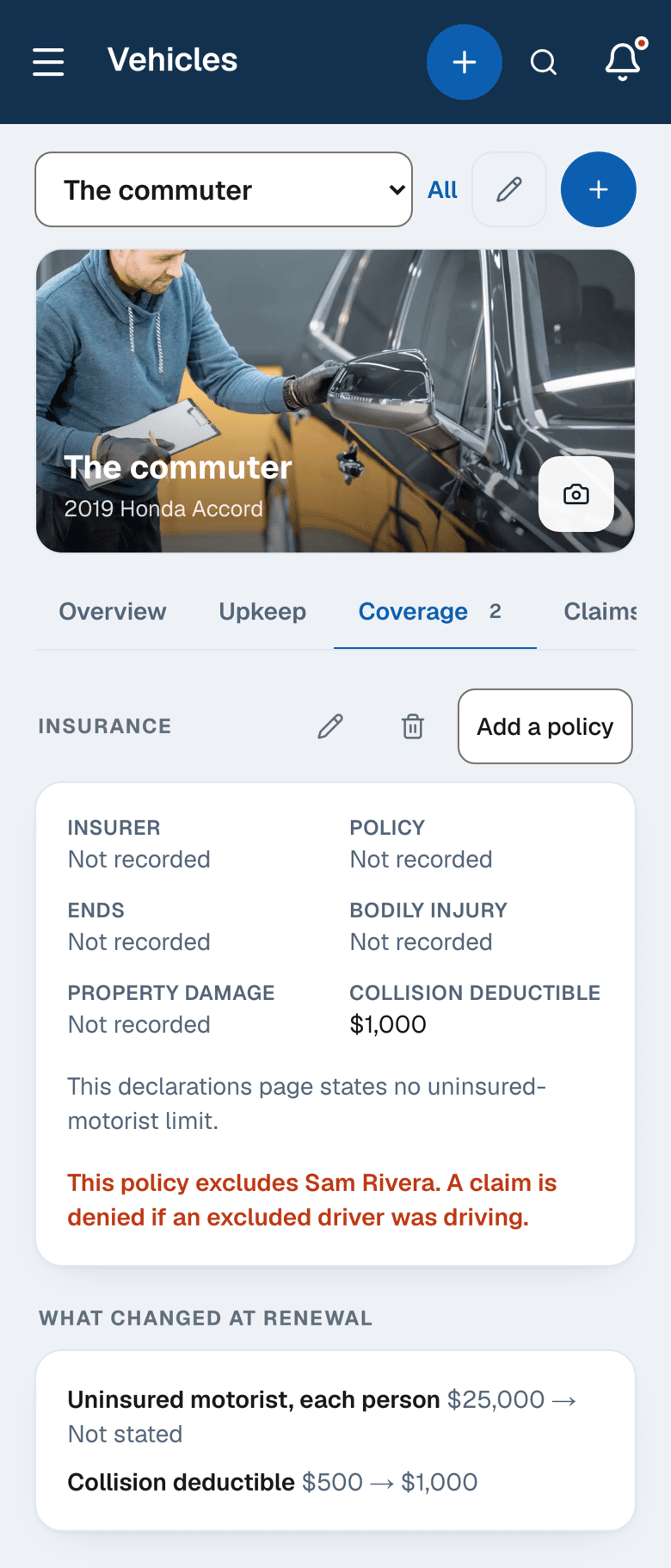
When your car insurance renews, you see exactly what changed.
You enter each policy term, and the app lays last term beside this one. A deductible that went up or a limit that disappeared is marked for you.
Your car's dates are watched.
Registration, inspection, a temporary tag and the warranty each appear on Today before they run out.
The dealer's promises are written down.
If the dealer still owes you a second key or floor mats, it stays on the car's record until it's delivered.
Your car's papers stay with it.
The title, the registration and the policy are filed on the car, so you can find them at the counter.
Your home
You see which parts of your house are due for replacement in the next ten years.
You add the furnace, the water heater or the roof and the year each one went in. The app shows the years one like it is usually replaced, so you can plan for the cost before it arrives.
- Due for replacement (example)
- Furnace · Typically replaced 2028-2038 · put in 2013 · lasts 15-25 years

You list what you own.
Record each machine with its kind, its brand and the year it went in, so its service life starts counting from the right date.
Each machine gets a replacement window.
The window comes from the year it went in and how long one like it lasts, shown as a range of years.
The house tells you what it takes.
Record the furnace filter size or the softener salt, and the app reminds you when it's time to replace it.
Documents
Your papers are on the record before the day someone asks you for them.
You attach each receipt, warranty and photo to the home, project or car it belongs to. When a manufacturer, an insurer or a buyer asks for proof, you open the record and the paper is already there.

A warranty claim asks when it went in.
The machine's install year sits on your home, and the job's invoice sits on its own project, so you answer the manufacturer quickly.
An insurance claim asks how it looked before.
Your dated photos of the roof and each room show the insurer the condition of the house before the claim.
A buyer asks what work was done.
The home dossier puts the work, the warranties and the papers on one page for an agent or a buyer.
Your tax preparer asks about improvements.
The improvements register lists each improvement with its IRS category and the receipt you attached to it.
Household
You share a home by email and choose what each person is allowed to do.
Sharing comes with Home+. You give each person View, Act or Manage and tick which parts of the home they see, so your partner and the house sitter each get the access that fits.

View lets someone look.
They see the parts of the home you tick, and nothing they do changes your record.
Act lets someone do the household's to-dos.
They tick off the jobs on the home's to-do list and leave the rest of the record alone.
Manage lets someone add and edit records.
They add and change records in the parts you tick, while only you share, transfer or delete the home.
You switch each area on or off.
Home record, projects, vehicles, documents, to-dos and budget each have their own tick for each person.
Sharing a home needs the homeowner to hold Home+. Act and Manage need the person you invite to hold Home+ on their own account; without it they join at View.
Plans
Home stays free until you want a second home, a second project or a second car.
Home+ lifts every limit and lets you share a home by email. Your first month of Home+ is free,[1] and you upgrade inside the app whenever you're ready.
A second home needs Home+.
You add the rental or the lake house and switch between them.
Sharing needs Home+.
You invite your partner or a sitter by email and choose what each of them sees.
Two managers need Home+ Duo.
Two people each get their own Home+ and their own login on one plan.
A bigger household needs Home+ Family.
Up to six people each get their own Home+ and their own login on one plan.
The first month free is for a new account on monthly Home+, started on the web with a card. Home+ then renews automatically until you cancel. The price and terms are shown and acknowledged in the app before any payment is taken.
Your first home is free on Satisfy+, and everything you add to it stays yours.